
Who would know if your mother fell in the garden and couldn't reach the phone? For many families, that question is the real reason they look at an Apple Watch. Fall Detection is built into most current models, and it is free once you own the watch.

This guide explains in detail what Fall Detection does and doesn't do, based on Apple's support documentation checked in November 2026. It is not a medical device review, and it is not a replacement for a fall prevention plan.
Which Apple Watch models have Fall Detection
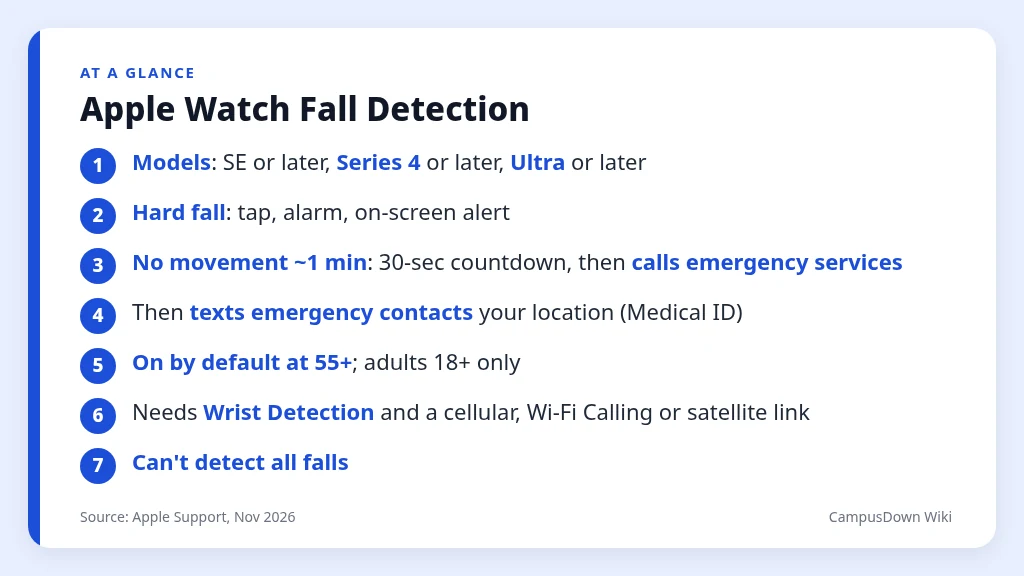
According to Apple, Fall Detection works on:
- Apple Watch SE or later (all SE generations)
- Apple Watch Series 4 or later
- Apple Watch Ultra or later
If a parent has an older Series 3 or earlier, it does not have this feature.

What happens after a hard fall
- The watch taps you on the wrist, sounds an alarm and shows an alert.
2. You can choose to call emergency services, or tap "I'm OK" or Close to dismiss it. 3. If the watch senses you are moving, it waits for you to respond and won't call automatically. 4. If you have been immobile for about a minute, it starts a 30-second countdown, tapping your wrist and sounding an alert that gets louder. 5. When the countdown ends, it calls emergency services and plays an audio message saying a hard fall was detected, with your location as latitude and longitude. 6. After the call, it messages your emergency contacts with your location. Contacts come from your Medical ID.
If the call goes through by mistake, Apple says don't hang up. Wait for a responder and explain you don't need help.
How to turn it on
Open the Watch app on the iPhone, tap My Watch, tap Emergency SOS, and turn Fall Detection on. You can choose Always on or Only on during workouts.
A few settings matter:
- If the age entered in Health is 55 or older, Fall Detection turns on automatically. Check that the age is correct.
- It is available only for people 18 or older.
- Wrist Detection must be on for automatic calls (Settings > Passcode on the watch).
- Set up Medical ID and emergency contacts on the iPhone. Turning on Share During Emergency Call lets responders see Medical ID details.
What it needs to call for help
Apple says Fall Detection requires a cellular connection, Wi-Fi Calling with internet, or satellite connection from the watch or a nearby iPhone.
- A GPS-only watch away from its iPhone and Wi-Fi may not be able to call.
- A GPS + Cellular model can call on its own where cellular service is available and the watch is set up for it.
- With iPhone 14 or later or Apple Watch Ultra 3, Fall Detection notifications may go through Emergency SOS via satellite when you are outside cellular and Wi-Fi coverage, where available.
If an older adult walks or gardens without carrying the phone, take a closer look at that difference before you buy.
Limits to know
- Apple states plainly that the watch cannot detect all falls. A slow slide out of a chair may not register.
- High-impact activity can trigger a false alert.
- It only works if the watch is worn and charged. Overnight charging leaves the night bathroom trip, a common time for falls, uncovered unless you plan around it.
- Falls are logged in the Health app under Number of Times Fallen. Share that history with your doctor.
| Question | Apple Watch Fall Detection | Traditional medical alert button |
|---|---|---|
| Detects hard falls automatically | Yes, if worn | Only models with fall detection |
| Calls without the phone nearby | Cellular model or satellite only | Usually, via base unit or cellular |
| Monthly fee | Cellular plan if used | Usually a service fee |
| Needs daily charging | Yes | Varies |
The NIA notes medical alert systems carry a fee and are usually not covered by insurance.
Example scenario: the tomato garden
- Who
- Thelma, 76, a retired school librarian in Tucson, spent every cool morning in her raised tomato beds. Her daughter Renata, who lives in Denver, gave her a cellular Apple Watch SE after Thelma admitted she had "sat down hard" twice that summer.
- What happened
- Thelma thought the watch was fussy. She left her phone inside while gardening and saw no reason to carry it.
- How it felt
- She also felt a little insulted. "I'm not an invalid," she told Renata, and she worried the watch would call an ambulance every time she knelt in the dirt.
- What they did
- Renata set up Medical ID, added herself and a neighbor as emergency contacts, confirmed Wrist Detection and checked that Thelma's age was right so Fall Detection was on. In October, Thelma tripped on a hose and landed hard on the gravel path. Dazed, she didn't respond to the alert. After the countdown, the watch called 911 and texted Renata and the neighbor her location.
- How it turned out
- The neighbor reached her within minutes. Thelma had a fractured wrist, set the same day. Back home, she started a balance class and moved the hose reel. She says the watch didn't stop the fall, but it meant she wasn't alone on the ground.
This is an illustrative example, not a real patient or a review.
Thelma and Renata are illustrative examples. Apple Watch is not a substitute for medical advice.
Most-asked questions about Apple Watch fall detection
Which Apple Watch models have fall detection?
Apple Watch SE or later, Series 4 or later, and Apple Watch Ultra or later. Series 3 and earlier do not.
Why people ask: "apple watch fall detection which models" is #8 for "apple watch fall detection" (US autocomplete, November 2026).
Does Apple Watch fall detection call family?
After it calls emergency services, it sends a message with your location to the emergency contacts in your Medical ID. It does not call family instead of 911.
Why people ask: "apple watch fall detection call family" is #2 for "apple watch fall detection" (US, November 2026).
Is Apple Watch fall detection good for seniors?
It can help an older adult get help when they can't reach a phone, and it turns on automatically at 55+. It can't detect every fall and must be worn and charged.
Why people ask: "apple watch fall detection for seniors" is #3 for "apple watch fall detection" (US, November 2026).
Where are the Apple Watch fall detection settings?
In the Watch app on iPhone: My Watch > Emergency SOS > Fall Detection. Choose Always on or Only on during workouts.
Why people ask: "apple watch fall detection settings" is #4 for "apple watch fall detection" (US, November 2026).
Is Apple Watch fall detection too sensitive?
Apple says high-impact activity can trigger it. You can dismiss an alert, and if you're moving, it won't call automatically. Apple's guide doesn't describe a sensitivity setting.
Why people ask: "apple watch fall detection too sensitive" is #5 for "apple watch fall detection" (US, November 2026).
Related on CampusDown
Learn more about the heart features on the same watch in Apple Watch ECG and AFib. If a fall happens, check the steps for yourself in how to get up after a fall, and reduce the odds with our fall prevention checklist and balance exercises. If a parent has stopped going out, learn more in fear of falling.
Frequently asked questions
- Does Fall Detection work without an iPhone nearby?
- Only on a cellular model with service, over Wi-Fi Calling, or via satellite with iPhone 14 or later or Apple Watch Ultra 3 where available.
- Can I turn it off at night?
- You can choose Only on during workouts or turn it off, but most falls in older adults happen at home, so think it through with your family.
- Should an older parent get the cellular model?
- If they often go out or garden without their iPhone, a GPS + Cellular model lets the watch call on its own where service is available. It adds a monthly carrier fee.
Apple Watch Fall Detection is a strong safety net when it is worn, charged and connected. It doesn't prevent falls, and it can't catch every one. Pair it with home fixes and exercise, and talk with your doctor about any fall it records.
Browse more guides like this in the Home Medical Devices hub.
This article is for general education and does not replace advice from your own doctor, nurse or pharmacist.