
Did your Apple Watch just buzz with a message about an irregular rhythm, and now you are wondering whether to go to the ER? Or did you take an ECG and get "Inconclusive" three times in a row? These are the most common Apple Watch heart questions, and Apple's own support pages answer most of them.

This guide summarizes Apple Support pages on the ECG app, heart health notifications and AFib History. If you or a parent wears an Apple Watch for heart reasons, take a closer look at the "what it cannot do" section.
Three different features
Apple Watch has three heart rhythm tools, and people often mix them up:
- ECG app: you take a 30-second recording when you choose.
- Irregular rhythm notifications: the watch occasionally checks your pulse in the background and alerts you to a rhythm suggestive of AFib.
- AFib History: for people already diagnosed with AFib, a weekly estimate of how much time the heart showed signs of AFib.
All three are about atrial fibrillation, an irregular rhythm that raises stroke risk.

The ECG app
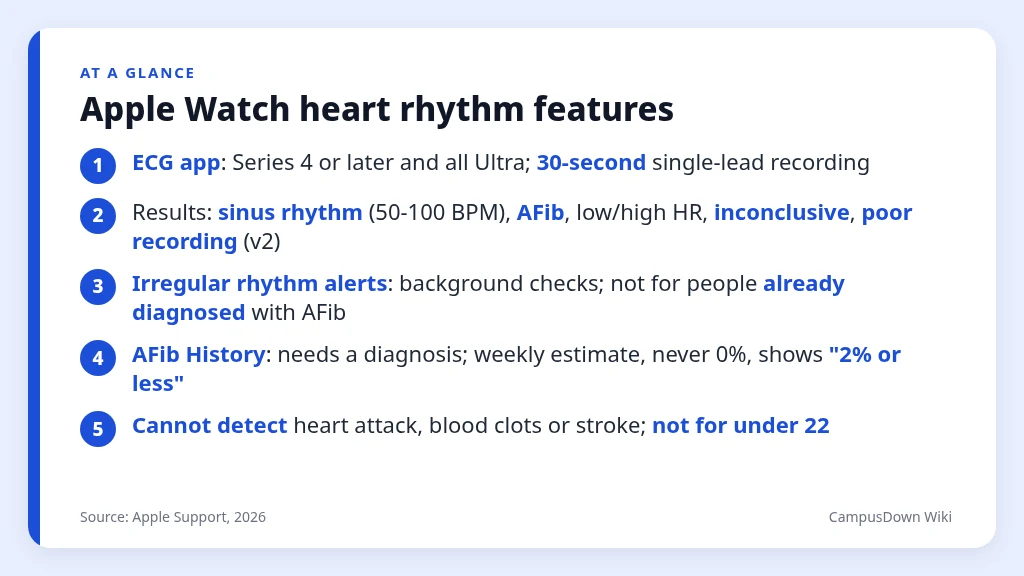
Apple says the ECG app uses the electrical heart sensor on Apple Watch Series 4 or later and all models of Apple Watch Ultra. It creates a recording similar to a single-lead (Lead I) ECG. The ECG app is not intended for people under 22, and must be set up in the Health app on iPhone.
How to take one, per Apple:
- Make sure the watch is snug and on the wrist you selected.
2. Open the ECG app and rest your arms on a table or in your lap. 3. Hold a finger from the opposite hand on the Digital Crown (no need to press). 4. Wait 30 seconds, then add symptoms if you have any.
What the results mean
- Sinus rhythm: a uniform pattern between 50 and 100 BPM for that recording. Apple notes it does not mean you are healthy.
- Atrial fibrillation: an irregular pattern. ECG version 1 checks for AFib between 50 and 120 BPM; version 2 between 50 and 150 BPM. If you have not been diagnosed with AFib, Apple says talk to your doctor.
- Low or high heart rate: outside those ranges, the app cannot check for AFib.
- Inconclusive: cannot be classified, for example with a pacemaker or ICD, other arrhythmias, or (version 1) heart rate between 100 and 120 without AFib.
- Poor recording (version 2 only): fix the fit, rest your arms, stay still, and make sure your wrist and watch are clean and dry.
Irregular rhythm notifications
Apple says these alerts look at your heartbeat occasionally, usually when you are still, and confirm an irregular rhythm with multiple readings before notifying you. They are not designed for people diagnosed with AFib, are not intended for people under 22, and require AFib History to be off. Apple also states the feature cannot detect all instances of AFib, so not getting an alert does not mean you are in the clear. Low Power Mode turns off these notifications.
Example scenario: the alert at the barbecue
- Who
- Greg, 63, a Korean American dentist in California, wore an Apple Watch Series 10 mostly for workouts.
- What happened
- During a family barbecue, the watch showed an irregular rhythm notification. He took an ECG, which said Inconclusive, then another that said Atrial Fibrillation. His heart felt only a little "fluttery."
- How it felt
- His first instinct was embarrassment: he did not want to ruin the party. Then fear, because his father had died of a stroke. His wife saw his face and asked what was wrong.
- What they did
- He sat down, took another ECG with his arms on the table, and called his doctor's after-hours line, which told him to come in the next morning unless he developed chest pain, fainting or stroke signs. He exported the ECG PDFs from the Health app.
- How it turned out
- A 12-lead ECG and a two-week monitor confirmed paroxysmal AFib. His doctor reviewed his stroke risk and started treatment. Greg now uses AFib History, and says the watch did not diagnose him, but it got him to the person who could.
This is an illustrative example, not a real patient or a review.
Greg is an illustrative example, not a real patient. A watch result is a reason to talk to your doctor, not a diagnosis.
AFib History and "2% or less"
AFib History requires a physician diagnosis of AFib, and Apple says you must wear the watch at least 12 hours a day, 5 days a week to get consistent estimates. Every Monday it shows the estimated percentage of time your heart showed signs of AFib the week before. Apple says it will never show 0%; the lowest result reads "2% or less." After 6 weeks it can show Highlights for the days and times AFib appears most. You can export a PDF or share it with family or enrolled U.S. providers.
What the watch cannot do
Get help now if
Apple says the ECG app cannot detect a heart attack, blood clots or stroke, high blood pressure, heart failure or other arrhythmias. If you have chest pain, pressure or tightness, or stroke signs, call 911 right away; do not take an ECG first. Do not change any medicine based on a watch reading.
Most-asked questions about Apple Watch and AFib
What does "2% or less" mean on Apple Watch AFib History?
It is the lowest estimate AFib History shows. Apple says the estimate never shows 0%; very little or no detected AFib appears as "2% or less."
Why people ask: "apple watch afib 2 or less" is the #4 Google suggestion for "apple watch afib" (US autocomplete, November 2026).
How accurate is Apple Watch AFib detection?
Apple says irregular rhythm notifications cannot detect all AFib and may sometimes flag another irregular rhythm. A positive result needs confirmation with a medical ECG.
Why people ask: "apple watch afib accuracy" is #3 and "apple watch afib false positive" is #5 for "apple watch afib" (US, November 2026).
Why does my Apple Watch ECG say Inconclusive or Poor Recording?
Common reasons Apple lists are a loose band, arms not resting, movement, sweat or water, a pacemaker or ICD, other arrhythmias, or a heart rate outside the checked range.
Why people ask: "apple watch ecg poor recording" is #5 and "apple watch ecg inconclusive" is #6 for "apple watch ecg" (US, November 2026).
Can Apple Watch ECG detect a heart attack?
No. Apple says the ECG app cannot detect a heart attack. Call 911 for chest pain or pressure.
Why people ask: "apple watch ecg heart attack" is #8 for "apple watch ecg" (US, November 2026).
Which Apple Watch models have ECG?
Series 4 or later and all Apple Watch Ultra models, where the ECG app is available in your country or region.
Why people ask: "apple watch ecg app" is #4 for "apple watch ecg" (US, November 2026).
You can check it for yourself tonight: open the Health app, tap Browse, then Heart, and see which features are set up and which ECG version you have.
Related on CampusDown
You can learn more about the KardiaMobile 6L six-lead EKG, Samsung Galaxy Watch ECG, normal resting heart rate and AFib symptoms in women.
Frequently asked questions
- Can I use the ECG app with a pacemaker?
- Apple says a pacemaker or ICD can cause an inconclusive result; ask your cardiologist.
- Does Apple Watch SE have ECG?
- Apple lists the ECG app for Series 4 or later and all Ultra models.
- Can my doctor see my ECG?
- You can export a PDF from the Health app and share it.
- Should I stop my blood thinner if AFib History shows 2% or less?
- No. Never change medicines without your doctor.
An Apple Watch can be a helpful early warning, and its limits are written plainly in Apple's own instructions. Learn more about what a result means for you by sharing it with your doctor, and call 911 for any emergency symptoms.
Browse more guides like this in the Home Medical Devices hub.
This article is for general education and does not replace advice from your own doctor, nurse or pharmacist.